
Your connection diagram, done in ten minutes
Drop in the gear, join the ports and export a PDF anyone on site can follow. No CAD, no Visio stencils, no drawing boxes by hand.
Three steps and the diagram is done
Pick the actual gear
Search the catalogue by brand or model and the unit lands on the diagram with every port it really has, straight from its datasheet.
Run the cables
Drag from one port to another. The line routes itself, hops over the ones it crosses and is labelled with the signal type.
Hand over the PDF
A clean PDF with your logo, the client details and the cable schedule, ready to send to the crew or the sales rep.
The gear is already in there
No empty boxes to draw. Search the model and it shows up with its photo and its real ports: inputs, outputs, Dante, fibre, LAN, USB and reference. Missing one? Create it and keep it in your own library.
1,600+
units with their ports47
brands from the industry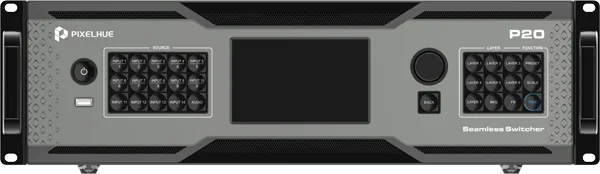
P20-DS
Pixelhue P20-DS
Inputs
HDMI In 1
HDMI In 2
DP In 1
DP In 2
12G-SDI In 1
12G-SDI In 2
Outputs
HDMI Out 1
HDMI Out 2
OPT Out 1
OPT Out 2
Dante Primary
Control & sync
LAN 1
USB 1
Ref In
Ref Loop
and up to 55 ports on the full record
This is how a unit lands on the diagram
That is a real card, not a box you had to draw: the photo of the unit, its inputs on the left, its outputs on the right and, separately, the control and sync ports. Every dot carries the colour of its signal and is where the cable comes from.
Built for load-in day
A real equipment catalogue
Over 1,600 units from 47 brands, with their inputs, outputs and control ports already filled in.
Cables that make sense
Orthogonal routing, hops at crossings, cable bundles and a label with the signal type.
A document for the client
PDF and PNG with header, logo, cable schedule and notes. It can also be emailed straight from the app.
Work as a team
Share the diagram by link: some watch, others edit at the same time, with live cursors on screen.
Version history
It saves itself as you work, and every export leaves a point you can go back to.
Your colours
Each signal type in the colour your company uses, and the same scheme across every document.
Start free and move up when you need to
Three free diagrams, forever. No card needed.
Free
To start drawing your rigs
0 €
/month
Up to 3 active diagrams
Up to 25 devices per diagram
Marketplace gear catalogue
Your own gear
PDF export with the AV Diagram logo
One guest, who can only edit with their own Pro
Pro
For the day to day of a technician or a production company
5 €
/month
Unlimited diagrams, unlimited devices
Up to 5 people editing at once
Version history and rollback
Send diagrams to the client by email
Templates: save your own and use the marketplace ones
PDF with a discreet footer: Created with AVDiagram.com
Enterprise
For large teams and documents under your own brand
10 €
/month
Everything in Pro
Up to 50 people editing at once
PDF with no AV Diagram mark at all
The whole office on a single account
Compare the plans in detail
| What's included | Free | Pro | Enterprise |
|---|---|---|---|
Active diagrams | 3 | No limit | No limit |
Devices per diagram | 25 | No limit | No limit |
People who can view the diagram | No limit | No limit | No limit |
Guests per diagram | 1 | 5 | 50 |
People editing at once | 1 | 5 | 50 |
Marketplace gear catalogue | |||
Your own gear | |||
Templates: save your own and use the marketplace ones | |||
Version history and rollback | |||
Send the diagram to the client by email | |||
AV Diagram mark on the PDF | Logo and text | A discreet footer only | None |
How invitations work
Viewing is free. Pass the link to whoever you like and they can open it, with no account, no limit on people and whatever your plan. Editing is another matter: you have to allow it, and one of the two of you needs a paid plan. Yours counts, and then your guests edit without paying anything. Or theirs counts, and then they can edit even if you are on Free. Having a plan never opens a diagram on its own: nobody edits yours without your permission.
Prices exclude VAT. You can change or cancel your plan whenever you like from your settings.Your next event, documented
Create an account and draw your first diagram in the time it takes to grab a coffee.
Create my account